
Foto de celular
vira fachada.
O prompt completo que transforma a foto de celular da frente do seu negócio numa foto de fachada no fim de tarde: perspectiva reta, luz acesa, calçada limpa. E o mesmo prédio, sem inventar letreiro. Sem cadastro.
01Antes e depois
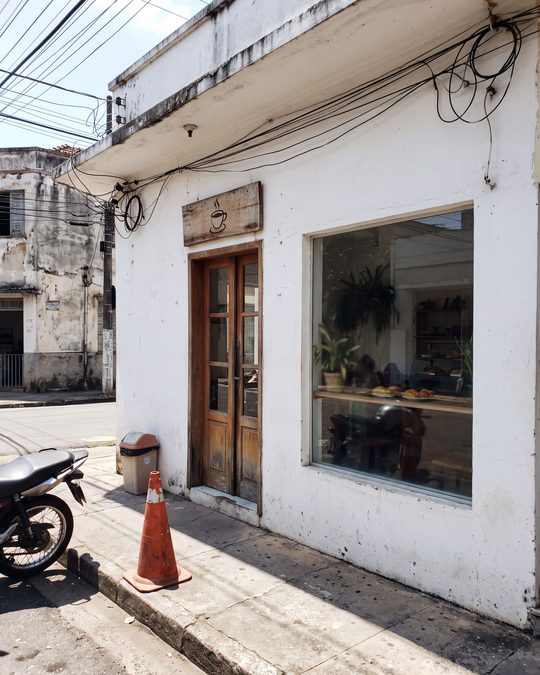
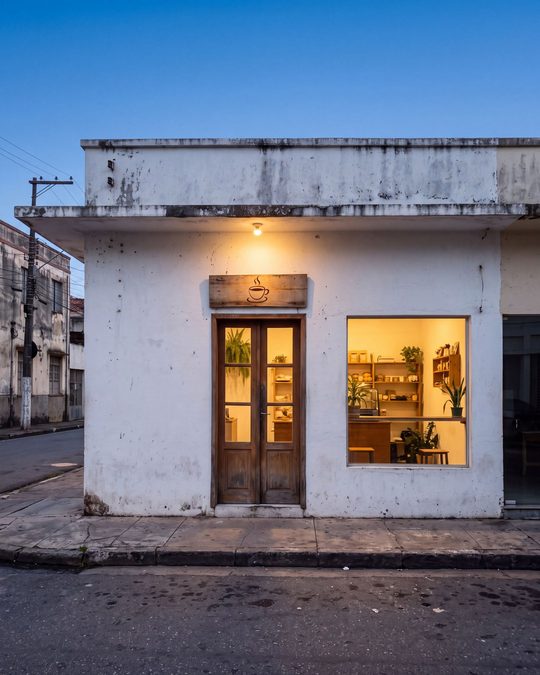
À esquerda, a foto de partida (meio-dia, moto, cone e fios). À direita, o resultado do prompt abaixo, sem nenhum retoque depois. As duas imagens são exemplos gerados por nós para mostrar o efeito.
02O prompt
Cole inteiro, com o Negative Prompt. Ele está em inglês porque os modelos de imagem seguem melhor assim.
Use the uploaded photo as the only reference for the storefront. Keep the real building exactly as it is: the same facade, wall color, door, windows, sign and the same logo or lettering on it, with the same proportions and materials. Do not invent, rename, translate or redesign any sign, text or logo. Do not add floors, awnings, plants, furniture or decorations that are not in the original photo. Re-photograph this exact storefront as a professional architectural photograph for a Google Business Profile and for social media. Straighten the perspective: vertical lines perfectly vertical, horizon level, camera at standing eye height, a gentle three-quarter frontal view taken from across the sidewalk. Compose vertically in 4:5 and leave the upper third of the frame as open sky above the roofline, with nothing in it. Set the scene at blue hour, about twenty minutes after sunset: a clear deep blue sky with a soft gradient toward the horizon, warm golden interior light glowing through the windows and the door, and the sign softly lit so it reads clearly. Clean the scene: remove temporary clutter that is not part of the building, such as parked vehicles, traffic cones, trash bins, loose hanging cables and passers-by, and leave the sidewalk clean and slightly damp, with subtle reflections of the warm light. Keep the permanent elements that belong to the street. Balanced exposure with no blown highlights and no crushed shadows, natural colors, realistic reflections on the glass, fine texture on the walls and the wood. Photorealistic and sharp, like a photo taken with a full-frame camera on a tripod and a 24 mm tilt-shift lens.

Negative Prompt: changed sign, invented text, fake logo, misspelled letters, extra floors, different door or windows, different wall color, added awnings, added plants, added furniture, people, cars, motorbikes, traffic cones, trash bins, tangled wires, distorted perspective, tilted verticals, fisheye, cartoon, illustration, 3D render, oversaturated colors, HDR halos, neon glow, fog, rain, snow, watermark, text overlay.
03Como usar
1. Fotografe a frente do negócio de dia, de frente, com o letreiro inteiro aparecendo. Quanto mais nítida a foto, mais fiel o resultado.
2. Abra o Gemini, o ChatGPT ou o app da AG LABS (Nano Banana 2.1, edição de imagem) e anexe a foto.
3. Cole o prompt inteiro e gere. Se o céu não ficar livre no alto, peça: “deixe mais céu acima do telhado”.
4. Compare com a foto original antes de publicar (veja abaixo).
04O que conferir antes de publicar
Letreiro com o mesmo nome, mesmas letras e mesmo logo. Mesma porta, mesmas janelas, mesma cor de parede. Nada que não existe (toldo, planta, mesa na calçada). Se a IA mudou alguma coisa, gere de novo: o cliente vai procurar exatamente essa fachada na rua.
No Perfil da Empresa no Google, a regra é que “a imagem deve representar a realidade” e que se evitem “alterações e aplicação de filtros em excesso” (Central de Ajuda do Perfil da Empresa). Use a versão do prompt no Instagram, no site e no cardápio; no Google, prefira a foto real bem tirada, ou só a correção de luz e perspectiva.